
Should you buy an off-the-shelf program for your business or have custom software built? The short answer: if your work fits the flow of an off-the-shelf program, use it; if the program doesn’t fit your work and that mismatch costs you time every day, you need custom software. Custom software is not a goal in itself; it is a tool you turn to where the ready-made solution falls short. In this post we explain the difference between the two, when custom software is needed, and how the process works.
When is off-the-shelf software enough?
Tasks like bookkeeping, payroll, e-invoicing, and basic inventory tracking look much the same in every business. Off-the-shelf programs in these areas have been developed for years, and most of the time they are the right choice. You can start using them right away, the vendor keeps up with regulatory changes, and you know up front what you will pay.
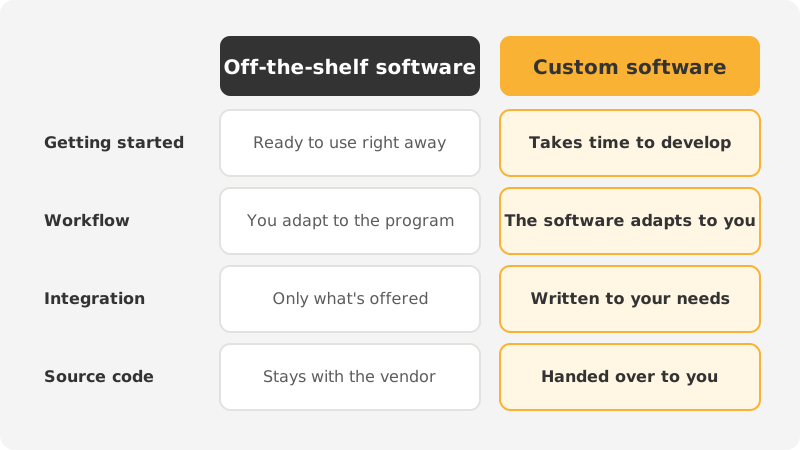
That is also where off-the-shelf software reaches its limit: it is written for everyone and knows nothing about what makes your business unique. Either you adapt your work to the program, or you keep the missing part somewhere else, usually in a spreadsheet.
When do you need custom software?
If you see any of these three signs, it is time to consider custom software:
- Your workflow doesn’t fit the off-the-shelf program. Your quoting, production, shipping, or appointment process has steps of its own, and the program doesn’t recognize them. Your team keeps looking for workarounds.
- Your programs don’t talk to each other. Your website, accounting, shipping, and warehouse all run separately. People carry the data between them by hand.
- The same data is entered twice. An order is typed into one place, then into another. Double data entry takes time and invites errors; when the two records don’t match, nobody knows which one is right.
Custom software does not always mean a large system built from scratch. Often what is needed is a small integration that connects the programs you already have: an order on your e-commerce website lands in accounting automatically, and inventory is updated in one place. For many businesses, the right place to start is filling in the missing piece rather than abandoning the off-the-shelf program.
Three questions to ask before you decide
- How much time is this costing us? A five-minute task done once a week doesn’t call for software. One that takes hours every day does.
- Can it be solved with a setting or an add-on in the off-the-shelf program? First find out where the limits of what you already have really are.
- Is the problem in the program or in the process itself? Turning a messy process into software doesn’t fix it. The process is simplified first; then the software is written.
How does the custom software process work?
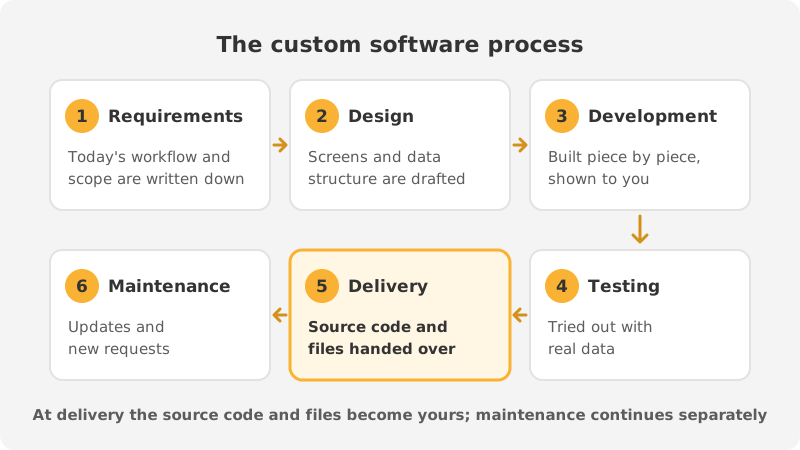
The process has six steps. The order matters; every skipped step costs more to fix later.
1. Requirements analysis
We talk to the people who do the work and map out the current flow step by step. What the software will not do is written down just as clearly as what it will do. The scope is settled at this stage.
2. Design
The screens and the data structure are first prepared as drafts. The people who will use the software review them, so gaps surface before any code is written.
3. Development
The software is developed piece by piece, and each piece is shown to you. A misunderstanding is caught early on, not at the end.
4. Testing
The software is tried out with real data and real users. Old records are migrated, and the results are compared with the old system.
5. Delivery
The software is installed and the team is trained to use it. The source code and files are handed over on delivery. The software is yours; you can continue developing it with another team in the future.
6. Maintenance
Software doesn’t end at delivery. As your business changes, new requests come up, and server and security updates are needed. The scope of maintenance should be discussed at the very start.
Why is it better to start small?
Asking for everything in the first version both drags the project out and increases its risk. Instead, pick the single workflow that wastes the most time and solve that first. Once the team starts using the software, what is truly needed becomes far clearer than it ever was around the meeting table. The next pieces are added based on that experience.
Most custom software runs as a dashboard opened in the browser; no separate installation is required, and the same screen is accessible from the office and the field. If the software will share infrastructure with your website, saying so at the outset lets the two projects be planned to work together.
In short
If your work is standard, an off-the-shelf program is enough. If your workflow is unique, your programs don’t connect, or you enter the same data twice, you need custom software. Start small: solve the single problem that wastes the most time, and add the rest later.
At 360DSGN, we handle custom software projects from requirements analysis through to maintenance. For details, take a look at our software page or contact us.