
On October 21, 2026, the PHP developers released an update that fixes two critical security vulnerabilities. Known as “PHP2Shell,” these flaws let an attacker run code on a web server without any password or login. The short answer: if your site runs on a PHP version older than 8.2.35, 8.3.36, 8.4.27 or 8.5.12, it needs to be updated; if you are on PHP 8.1 or older, you need to move to a supported version. In this post we explain what the vulnerability is, how to tell whether your site is affected and what you should do about it.
What is PHP, and why does this vulnerability affect so many websites?
PHP is the programming language that runs on the server side of a website. Widely used platforms such as WordPress, WooCommerce, OpenCart, Joomla, Drupal and Magento are all written in PHP. According to W3Techs, more than two-thirds of websites whose server-side language is known use PHP. In short, a business website, an online store or a blog is most likely running on PHP.
That is why a flaw in PHP itself affects a far larger audience than a flaw in a single plugin or theme: even if your site’s theme, plugins and content are up to date, the risk remains as long as the PHP version running the site is not.
What does the PHP2Shell vulnerability do?
There are two separate vulnerabilities. CVE-2026-109618 is caused by PHP corrupting memory while handling an out-of-memory condition; CVE-2026-109619 is caused by data left behind by one request being reused by the next. Both are rated 9.2 out of 10 on the CVSS 4.0 scale, which puts them in the “critical” category.
The real danger is that the attack requires no login. Without ever entering your admin panel, an attacker can run commands on the server simply by sending specially crafted requests. The researchers who found the flaws confirmed they could do this against sites running certain versions of WordPress, Joomla, Drupal and Magento. Someone who can run code on your server can plant malicious files on your site, access customer and order data in your database or redirect your visitors to other sites.
The reactions show how serious this is. In the US, the FBI, NSA and CISA, and in Europe, CERT-EU, advised updating immediately and, where that is not possible, taking systems offline temporarily. Some government websites in Japan, the Netherlands, Norway and Finland were taken offline as a precaution. Security firms report seeing the first exploitation attempts on October 17, before the vulnerabilities were even announced.
Which PHP versions are safe?
On October 21, 2026, the PHP team released fixes for four release branches. If the branch your site uses is running the version below or newer, it is protected against these two vulnerabilities:
- PHP 8.5: 8.5.12 or later
- PHP 8.4: 8.4.27 or later
- PHP 8.3: 8.3.36 or later
- PHP 8.2: 8.2.35 or later
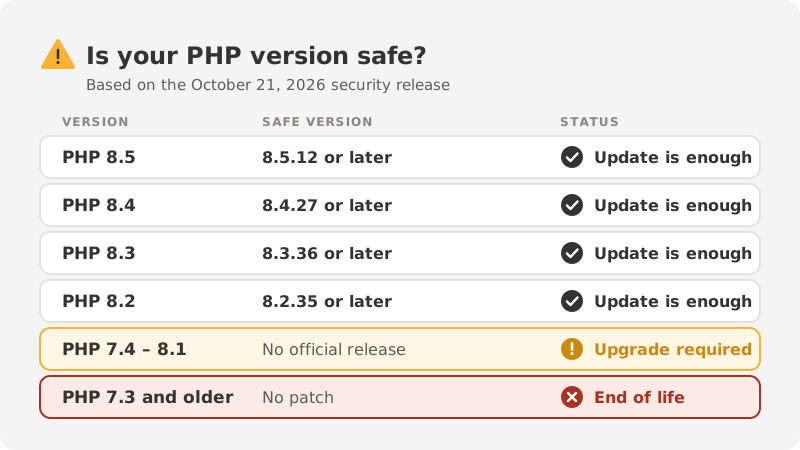
There is no official release for PHP 8.1 and older. For PHP 7.4, 8.0 and 8.1, only limited patches were published that have to be compiled from source; some Linux distributions and long-term support vendors may add them to their own packages. PHP 7.3 and older versions are completely end of life. For a site running on one of these versions, the lasting fix is moving it to a supported version.
How do you find out which PHP version your site runs?
- Hosting control panel: In cPanel, Plesk or DirectAdmin, look for “PHP Version,” “PHP Settings” or “MultiPHP Manager.” The version is often set per domain.
- WordPress: In the admin dashboard, the PHP version is listed under Tools → Site Health → Info → Server.
- Your hosting provider: If you cannot find it, ask your provider: “Which PHP version does my site run on, and has the October 21 security update been applied?”
One detail to watch: having a new PHP version installed on the server does not mean your site uses it. On shared hosting, a separate version can be selected for each site, so if an old version is selected for yours, your site keeps running on it even after the server is updated.
What to watch for before and after updating
The PHP version can be changed with a few clicks in the control panel, but switching it and walking away is risky, especially when moving from an old version to a new one. An old theme or plugin may not be compatible with the new version, and the site may start showing a blank page or errors.
- Back up the site’s files and database first.
- If possible, test the change on a copy of the site first.
- Update WordPress core, your theme and plugins; replace plugins that no longer receive updates.
- After the update, check the homepage, the contact form, the checkout (if you have one) and the admin dashboard one by one.
- If something breaks, restore the backup, fix the cause and try again.
Web application firewall services such as Cloudflare have published rules against known attack methods. These rules buy you time, but they only protect traffic that passes through that service and are a temporary measure. The lasting fix is updating PHP.
Could your site already have been attacked?

An update closes the vulnerability, but it does not undo a breach that has already happened. If you notice any of the following signs, your site needs a closer look:
- User accounts in the admin dashboard that you do not recognize
- PHP files on the server with meaningless names or recent changes
- Visitors being redirected to other sites, or unrelated titles appearing under your site in search results
- Warnings that spam email is being sent from your site, or excessive resource usage warnings from your hosting provider
- A “Security issues” notice in Google Search Console
In that case, updating PHP alone is not enough: malicious files have to be removed, all passwords changed and the site’s security settings tightened.
How we can help
Get in touch and we will check for free whether your site is affected. Once you send us your website address, we look at the signs that are visible from the outside and explain the result in plain language. If an update is needed, we take a backup first and then make sure the site works properly. We check your site no matter which agency built it.
If your site’s platform is too old to support current PHP versions, we can plan the move to an up-to-date website together.
Sources: CISA, Tenable, Rapid7, Anadolu Agency. Information current as of October 22, 2026.