

What is 3D modeling and animation used for? The short answer: 3D modeling is the way to show what a camera cannot capture: a product that has not been manufactured yet, a building that has not been built, or what goes on inside a machine. Once the model is ready, both still images and animations are produced from it. In this article we explain where 3D work is used, how the process works, and when it is the better choice over a shoot.
Where is 3D modeling used?
Showing a product that does not exist yet
A product whose mold has only just been ordered, a building whose foundation has not been laid, a plant that will take months to install. None of these can be photographed, yet promotion, sales meetings, and investor presentations start today. A model built from technical drawings and dimensions shows the product in its finished form. The catalog, the website, and trade show preparation do not have to wait for production to finish.
Explaining how something works
It is hard to show with a camera how fluid moves through a pump or the order in which a machine’s parts operate, because it all happens inside the housing. In an animation, the housing turns transparent, the parts separate, and a cross-section is cut. The viewer sees in a short video what would otherwise take pages of text to explain. Animations like this are used in sales presentations, training, and assembly instructions.
Producing product images
If the same product comes in many colors, finishes, or sizes, shooting each one separately is laborious. In the model, the material is swapped and the image is rendered again. Every option has the same lighting, the same angle, and the same quality. The result is a consistent image set for the catalog and the e-commerce website.
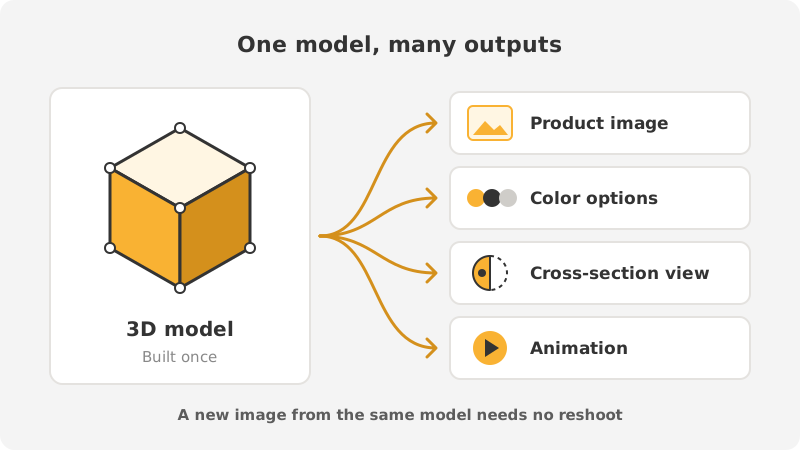
This is where the real value of the model shows. When a new color is added to the product or the catalog needs a different angle, nothing is redone from scratch; the existing model is opened and the required image is rendered. Later, the same model also becomes the starting point for an animation or a short video looping on a trade show screen. That is why the model files should be stored in an orderly way.
How does the process work?
3D work moves through five steps. Each step builds on the previous one, so approvals are obtained in order.
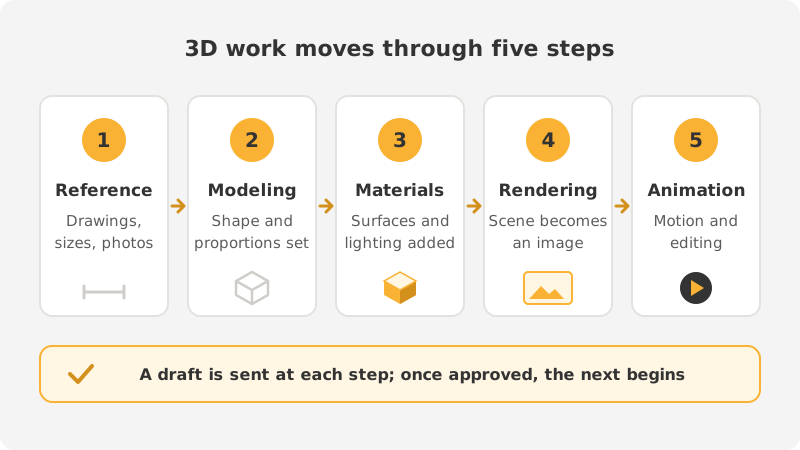
- Reference and dimensions: a technical drawing, a design file, photographs, or the product itself. The more precise the information we have, the more accurate the model.
- Modeling: the product’s form is built in three dimensions. There is no color at this stage; only form and proportions are approved.
- Materials and lighting: materials such as metal, plastic, glass, or fabric are assigned to the surfaces and the scene is lit. This is the stage that determines realism.
- Rendering: the computer calculates the scene and turns it into an image. A low-resolution draft comes first; the final images are produced after approval.
- Animation: if motion is needed, the camera path, the movement of the parts, and the duration are planned. The frames are rendered one by one; then editing, text, and sound are added.
The early steps are where changes are easiest to request. If a dimension changes after the form has been approved, the materials, lighting, and rendering have to be redone as well. That is why we send a draft at every stage and move on to the next step only after approval.
When is 3D the better choice over a shoot?
Photo and video shoots and 3D are not rivals. Which one fits depends on the job:
- 3D fits when: the product does not exist yet, what needs explaining is inside the housing, there are many colors and options, the product is too large to transport, or a shooting environment cannot be set up.
- A shoot fits when: you have the finished product in hand, people, place, and atmosphere matter (food, a hotel, the team, a production line), or the product needs to be shown in real use.
On most projects the two are used together. In a promotional video, the factory and the team are shown with live footage and the machine’s inner workings with animation. If you have the product in hand and only a few variants, a shoot is usually the shorter route.
What should you prepare before starting?
- The product’s dimensions, technical drawing, or design file if there is one.
- Color and material information; if possible, a sample or close-up photos.
- Where the image will be used: website, catalog, trade show screen. Resolution and format are set accordingly.
- If an animation is wanted, the message to convey and the approximate length.
In summary
3D modeling steps in where the camera cannot go: it shows a product that does not exist, explains workings that cannot be seen, and produces consistent images for products with many options. If the product is ready and atmosphere matters, a shoot is the right choice; if the product does not exist yet or what needs explaining is on the inside, 3D is.
At 360DSGN we handle modeling, product images, and animation in-house, from reference to delivery. For details, see our 3D modeling and animation page or contact us.